Solutions for project developers

From incoming invoices to project overview.
In real-time.

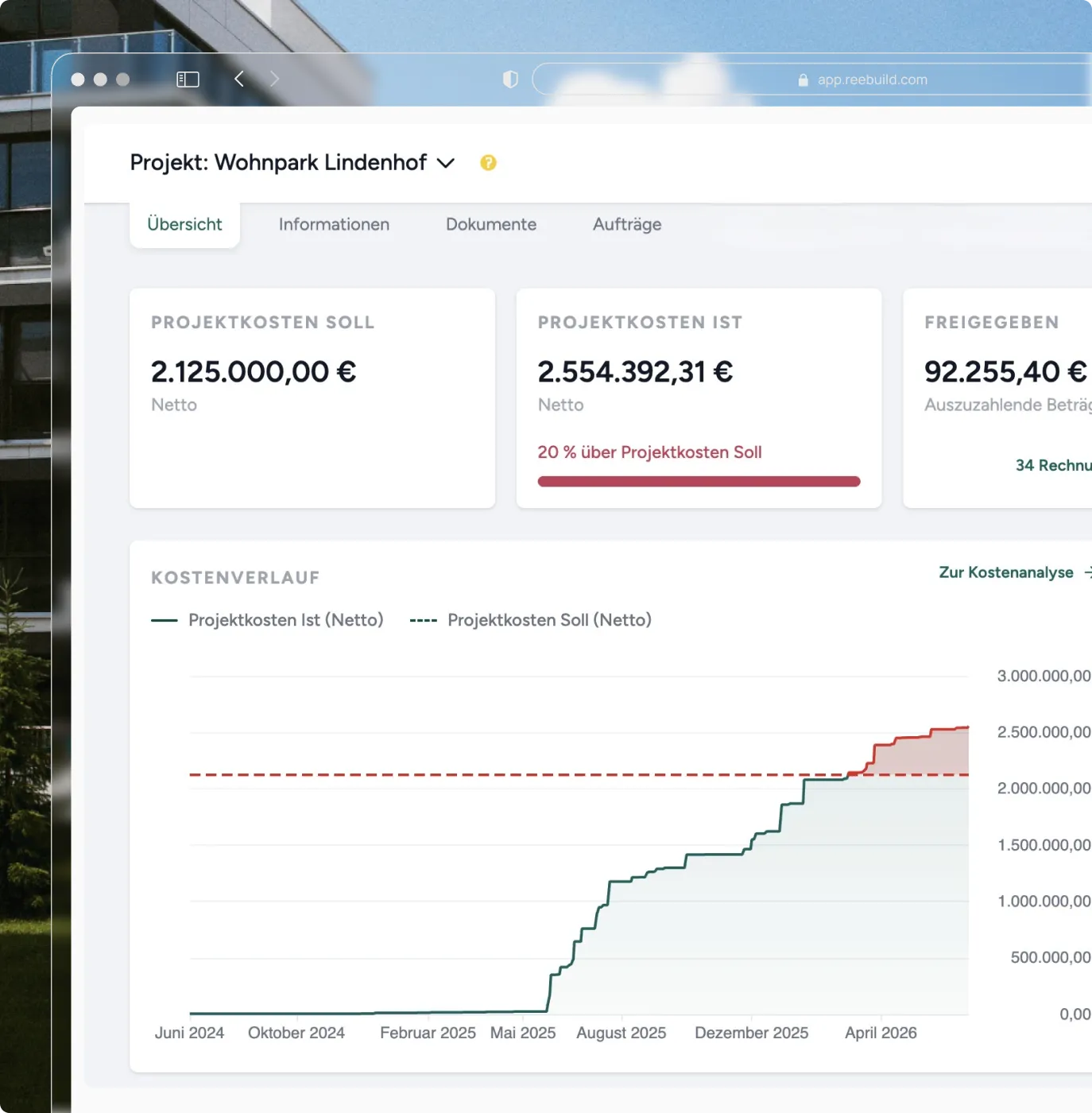
Project calculations, budgets, and cost trends in real-time — without Excel, without manual rework. reebuild digitally maps your projects and provides the figures you need for bank discussions, investors, and internal control.
Daily challenges

How many multi-million dollar projects do you manage with Excel, email approvals, and gut feeling?

Slow cost tracking and manual effort.
The current status of each project and its detailed costs compared to the budget cannot be accessed in real-time – a one-click status does not exist. The data and figures are in Excel sheets – spread across multiple files, maintained by different people, mostly estimated and outdated.
Invoice approvals at a glance.
Who is currently reviewing, who is waiting, and who has already approved? Lack of transparency and traceability turns every approval process into an open question and leads to you only seeing problems once they have already cost money.
Comparability across projects does not exist.
How do two projects perform in a direct cost comparison? What did my general contractor or subcontractor charge for a comparable 6-month project? Where can the cost structure be optimized for the next project based on this? Without systematic recording, the answers are just an estimate. Project developers who systematically record prices and services today negotiate from a stronger position on every new project.
What reebuild does

The right module for every challenge.

Six modules that together digitally map and automate your business processes. You choose what you need – reebuild grows with your requirements.
Invoice Verification

Verify invoices -
automated and item-by-item.

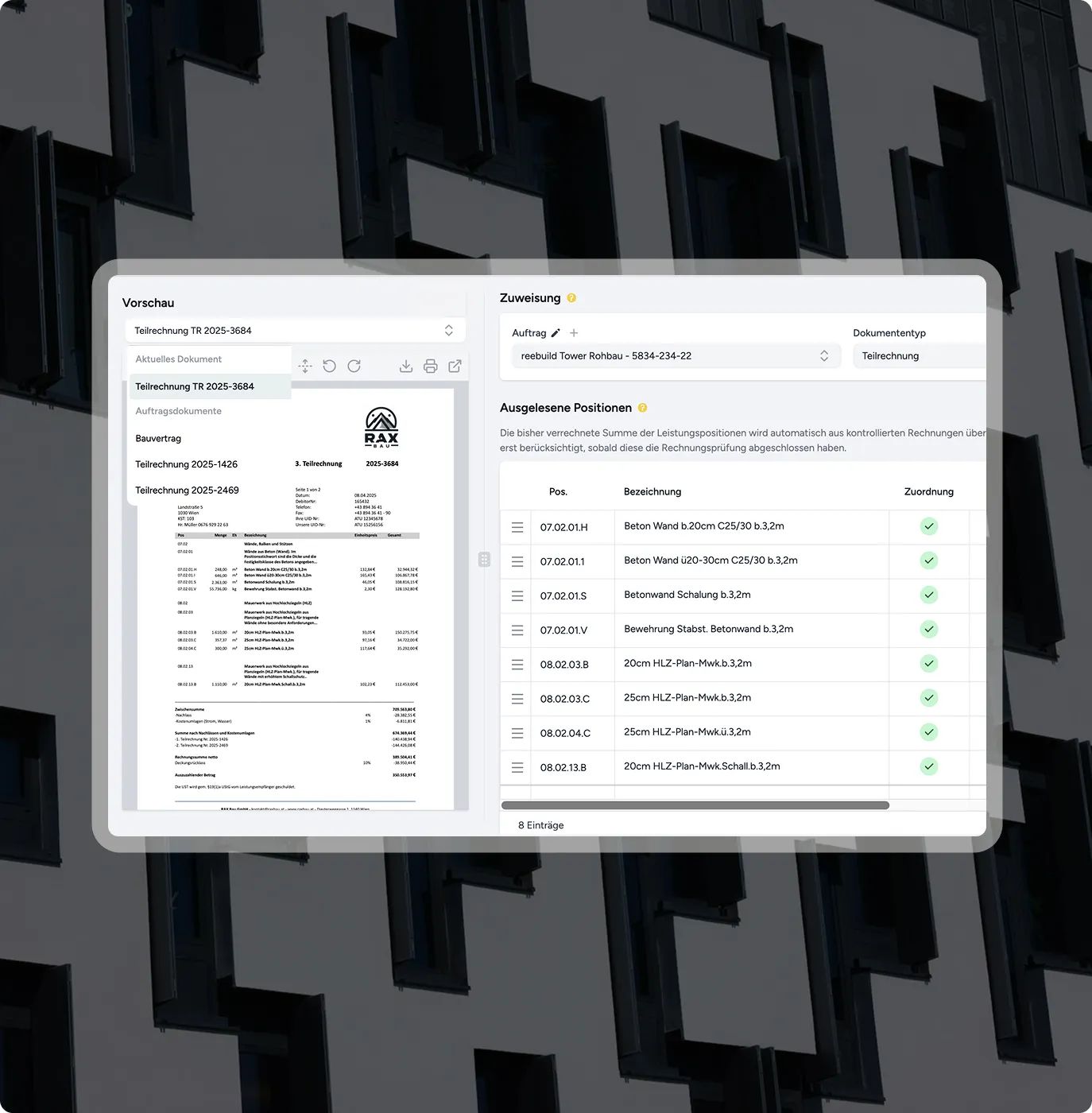
reebuild captures, verifies, and posts every incoming invoice – from simple individual invoices to complex subcontractor invoices. Quantities, prices, and orders are automatically reconciled, and corrections are recalculated immediately. Reviews and approvals are digital – anytime, anywhere.
Book a demo
Item-by-item extraction - ready to use immediately and without additional modules
Automatic invoice correction and verification sheet
Smart posting suggestions for accounting
Screenshot of an app for assigning and reviewing construction billing items with lists and details.
Workflow Management

Your approval processes -  
transparent, configurable, and audit-proof.
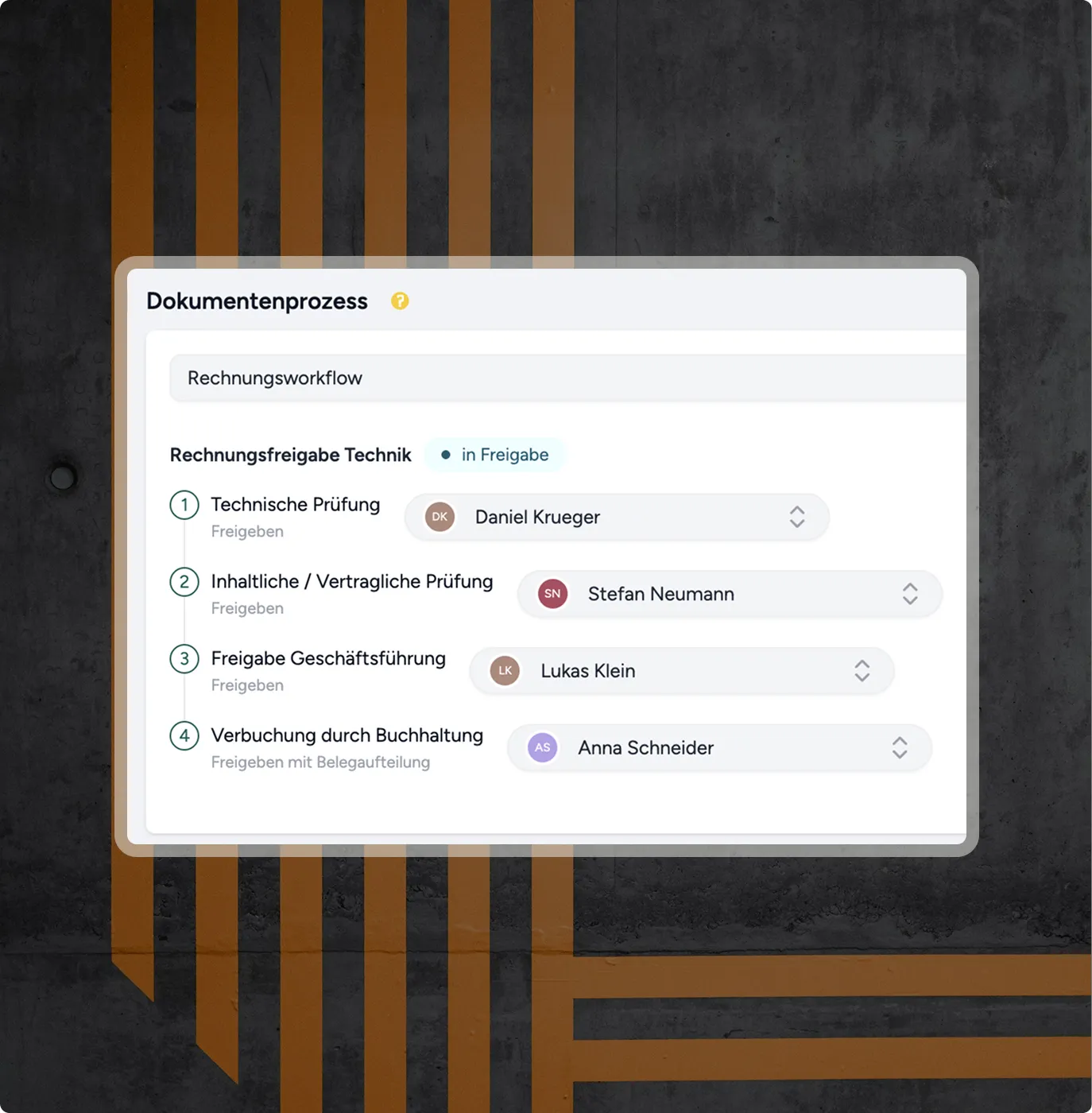
Who is currently reviewing, who has already approved, which invoice is still pending – all at a glance. All review and approval processes can be customized across locations and companies. Keep invoices on a watchlist, set up absence representatives, configure personal project views — reebuild adapts to how your company truly works.
Book a demo
Mobile bulk or batch approval for management
Set up absence representatives directly in the system
Second-by-second activity log for internal documentation and archiving
Screen showing document process for invoice workflow with four review and approval steps and assigned individuals.
Subcontractor Invoices

Subcontractor verification -
without manual calculations.
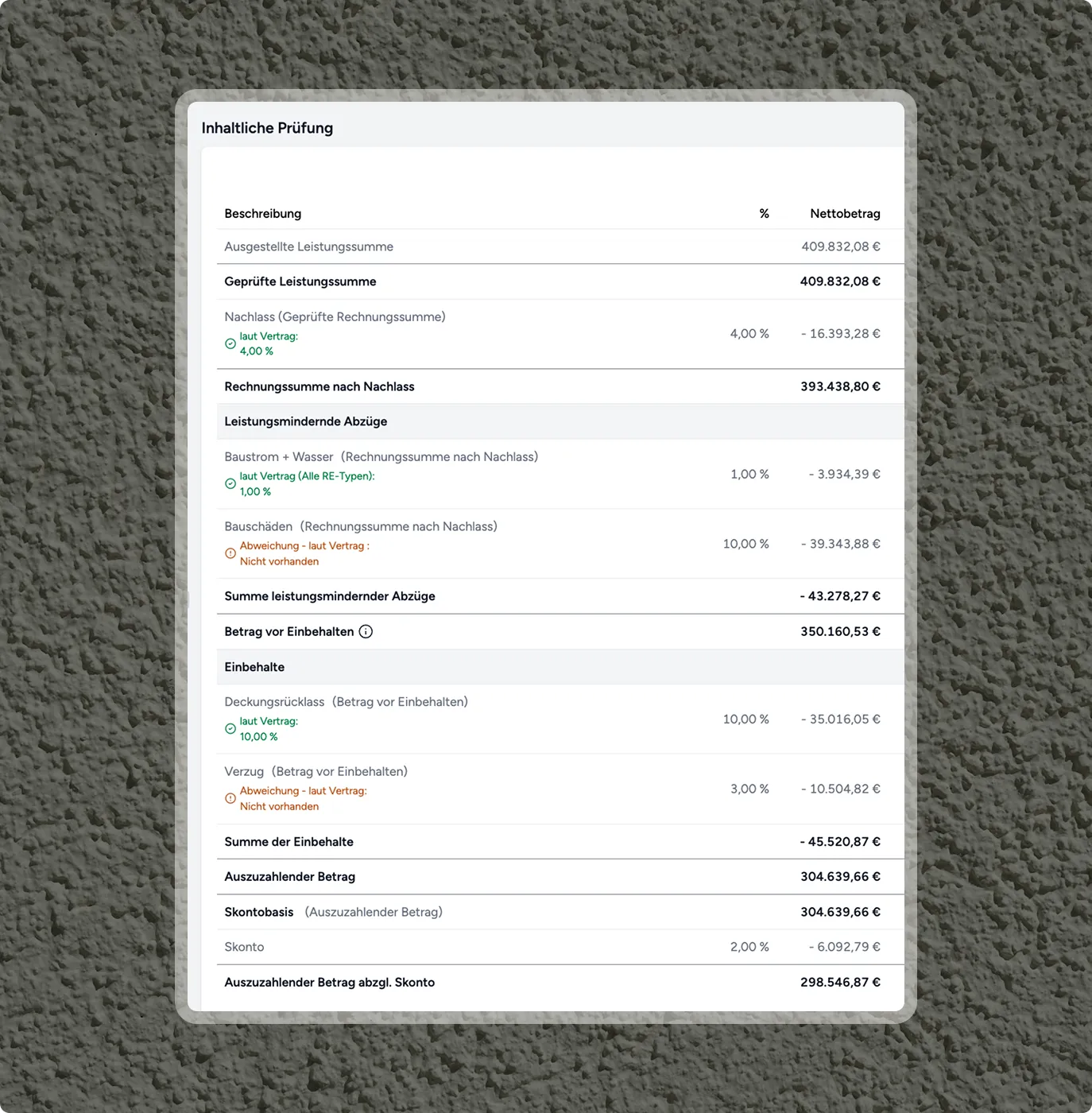
Project developers award contracts to general contractors or directly to individual trades – in both cases, invoices must be checked item by item. reebuild automatically combines the construction contract, bill of quantities, and measurement, and alerts you to discrepancies. As soon as you correct an item, reebuild automatically recalculates – whether for individual contracts or general contractor projects.
Book a demo
Line-item reconciliation against BoQ and construction contract
Overview of all retentions, deductions, guarantees, and discounts
Automatic correction sheet including comments for the subcontractor
Table with financial review of services, discounts, deductions, retentions, and amount to be paid out in Euros.
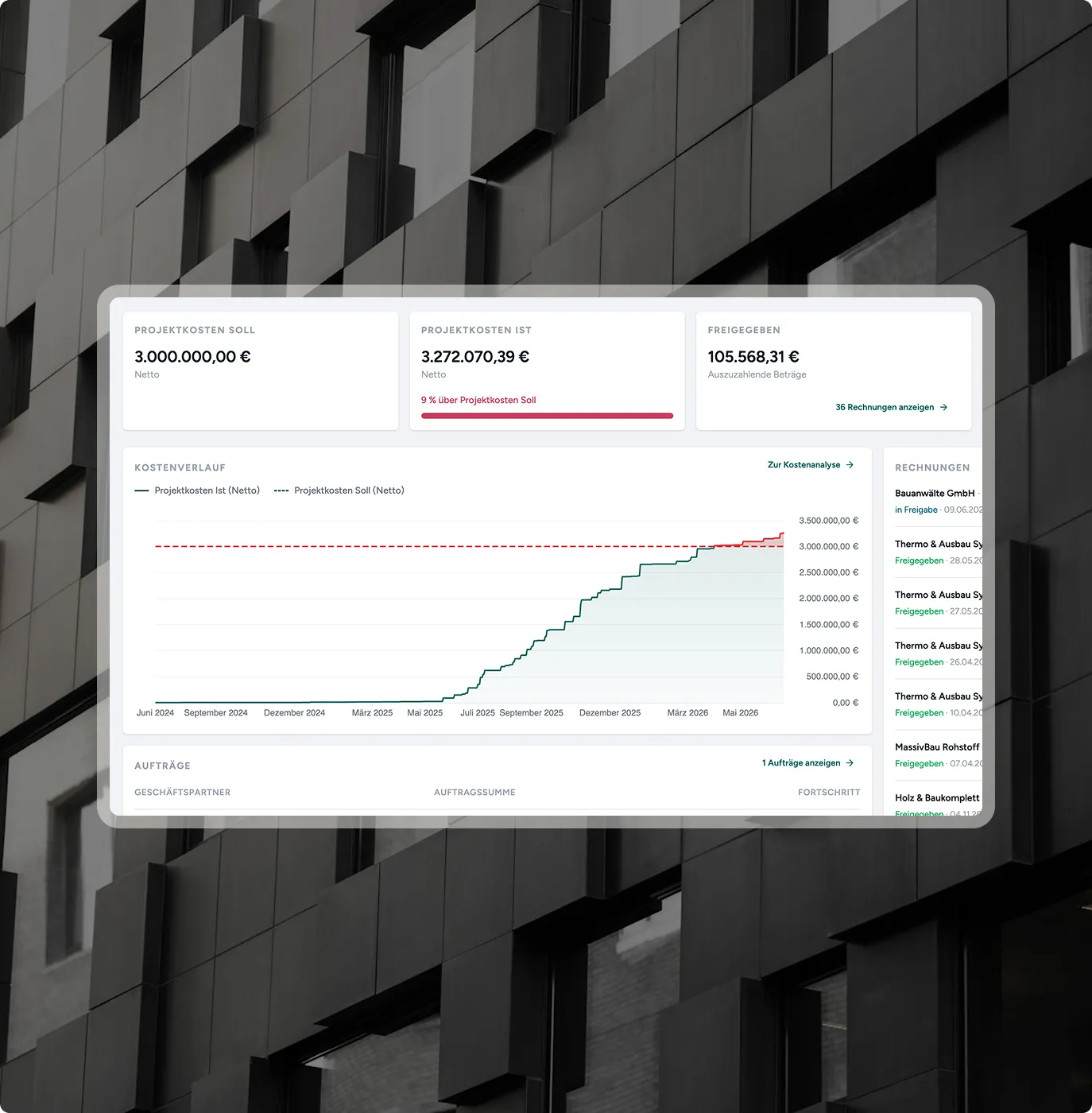
Dashboard shows project costs, cost trend, and approved amounts with details on invoices and orders.
Budget management

Real-time actual-vs-target comparison – before costs cause a cash flow shortage.

You set your budgets, and actual costs are automatically tracked against them, including the revenue side. You always see where each of your projects stands financially and have the figures ready that you need for bank discussions, investors, and internal control.
Book a demo
Cost and revenue side in one system
Smart connection of calculation, awarding, and forecasting
Approved invoices immediately update the actual-vs-target comparison
Cost analysis

Maximum level of detail – for every invoice and every cost item.
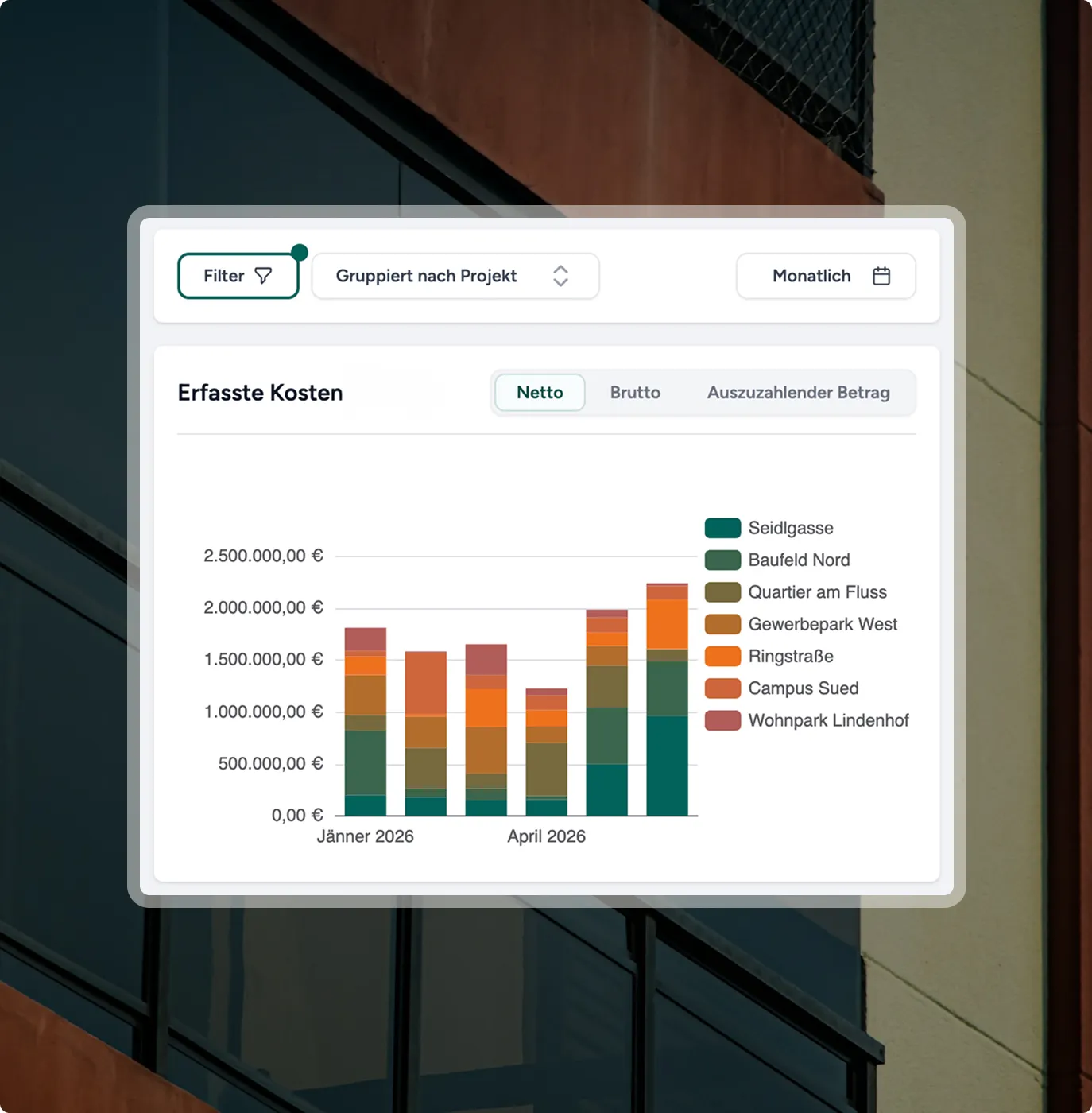
Excel only shows you the totals – reebuild reveals what's behind them. Costs are broken down to the individual bill of quantities item, and deviations are immediately visible. Filter by project, period, or subcontractor to identify which trade is driving costs, even before it becomes a problem.
Book a demo
Drill-down to the individual line item
Extensive filters by project, subcontractor, period, and much more.
Audit-proof exports for banks and shareholders at the push of a button
Bar chart shows recorded costs by project for January and April 2026 in Euros.
Document Storage

Every document discoverable - even in three years.
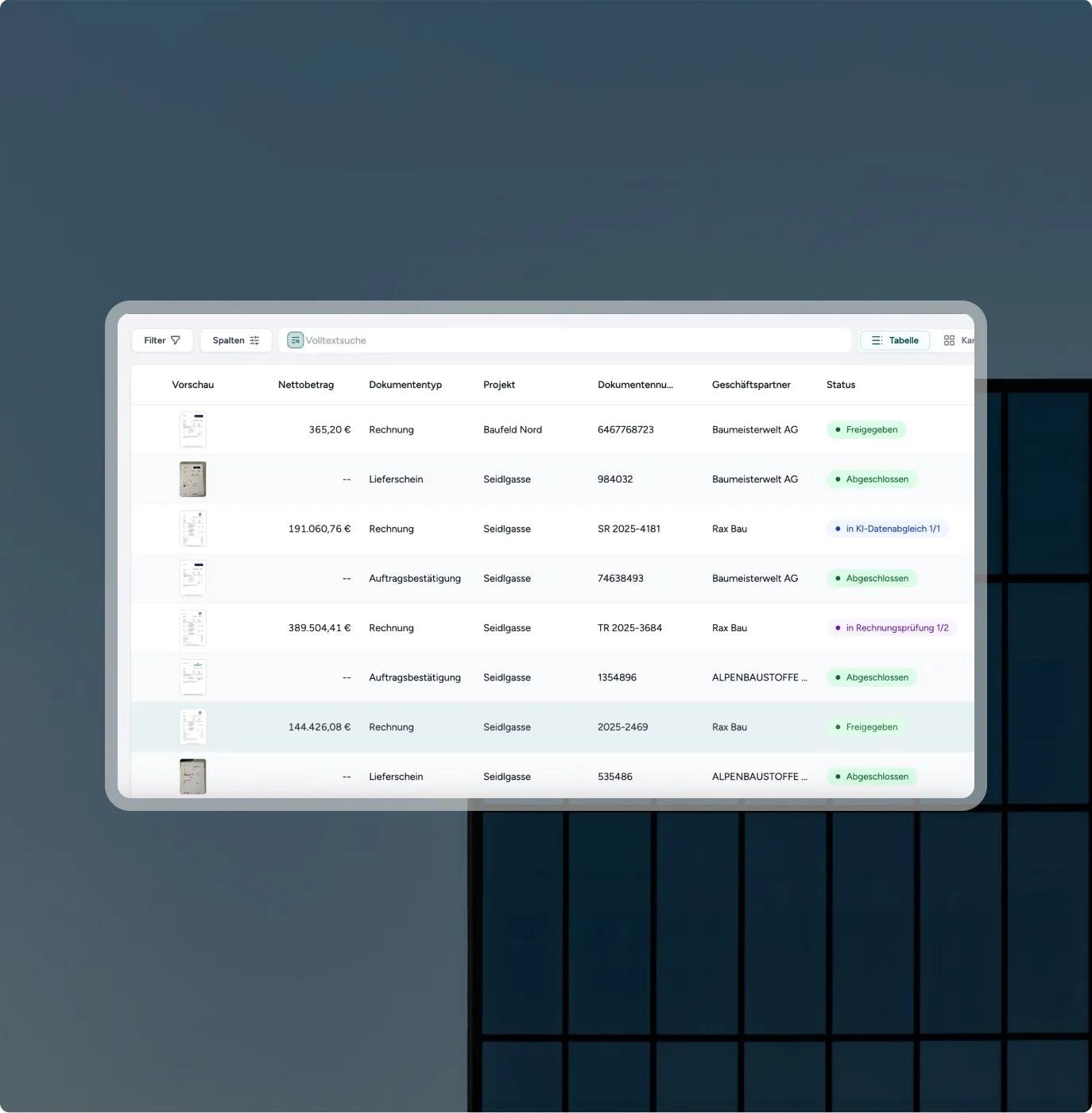
Contracts, invoices, correction sheets — automatically sorted by project, company, and business partner. From ring binders and basement archives to digital document storage. Whatever the bank, tax advisor, or client needs, it's accessible in seconds.
Book a demo
Sorting by project and company with individual filters
Full-text search across all documents
Audit-proof storage, 100% hosted in Germany
User interface with a document list, including invoices, delivery notes, project names, and status indicators.
€275+ million
Invoice Volume
approved via reebuild
Facade of a building with large windows and concrete struts in black and white.
4,600+
Projects and Construction Sites
in Austria, Germany, and beyond
Narrow, tall window opening in a gray concrete facade of a modern building.
185,000+
Documents
were processed by reebuild
Facade of a modern office building with large, square windows and gray panels.
reebuild was developed for these project developers
From small builders to large property owners, reebuild adapts to your processes.
Not yet on board? Talk to us – reebuild is already being used by project developers and builders in Austria, Germany, and beyond.
Project Developer
Facade of a modern building with several windows and white walls.
Property Owner
Close-up of a building with decorative sculptures below windows against a blue sky.
Property Developer
Facade detail of an old-fashioned building with red tiled roofs and green trees in the background.
Project Manager
Modern corner of a multi-story office building with glass windows against a blue sky.
FAQ

The most common questions - answered directly.

From how many employees does reebuild make sense?

From 10 employees upwards, there is no limit. From small project developers to large property owners, companies of all sizes use reebuild daily.

Can multiple companies and projects be managed in one system?

Yes. reebuild is fully multi-client capable, meaning all companies, subsidiaries, and projects run within a single instance. Each company can have its own workflows, approval levels, and permissions. Each person only ever sees what is relevant to them.

How does the interface to our ERP / financial accounting / existing system work?

reebuild integrates directly with DATEV, BMD, BRZ, and RZL via Plug & Play. Completed booking entries are automatically transferred, and documents are also transmitted where possible. We will clarify the connection to reebuild in our initial conversation. Fundamentally, reebuild can be connected to any system.

Which e-invoice formats does reebuild support?

reebuild supports all common e-invoice formats — ZUGFeRD, XRechnung, and Peppol. For e-invoices, reebuild automatically compares PDF and XML and immediately detects discrepancies. This means reebuild is already fully prepared for the upcoming e-invoicing mandate in Germany and Austria.

Can we customize the approval workflow ourselves?

Yes. You configure amount thresholds, approval levels, and responsibilities yourself — without developers, without an IT project. We set up the initial workflows together with you, based on best practices from the construction industry.

How does document management work?

All incoming documents, whether by email, scanner, API, or the reebuild photo app, are automatically read, classified, and assigned to the correct project, company, and business partner. The audit-proof storage is GoBD-compliant, hosted in Germany, and fully searchable at any time via a full-text search.

How long does the implementation take?

We support you in achieving the fastest possible implementation. The first invoices are processed by the system within the first few weeks. We guide you through the entire onboarding process with our expertise — you don't start from scratch.

How are our teams trained?

We guide you through the entire onboarding process – from workflow configuration to your first independent use. Most teams are fully trained within a few weeks. For foremen and field staff: the reebuild photo app has one button, so no training is needed.

What happens to our data if we stop using the service?

You can fully export all data at any time — no dependency, no lock-in costs. reebuild is hosted in Germany, fully GDPR compliant, and supports GoBD-compliant operations.

Does reebuild also work if invoices still arrive by mail?

Yes. reebuild processes all input channels: email, scanner, API, and the reebuild photo app. No matter how your invoices arrive today — reebuild handles them automatically.

How do I prepare reports for banks and investors?

reebuild provides all relevant cost data in real time — filterable by project, period, and cost type. Exports are available at the push of a button, without anyone having to manually compile data.

Software for Project Developers

Cost transparency as it should be for project developers.

Invoice approval, budget tracking, and cost analysis in one place - in real-time, without Excel, ready for your next bank meeting.
Three smiling people: two men and one woman, all against a neutral background.